Module 7

Meta ads in practice

16 lessons, 73 stepsOne instruction at a time, each with the result to expect. Tick steps as you go; Helix remembers.

Outcome: you can build and run a Meta (Facebook and Instagram) ad account in about 10 minutes a day. And you can spend more without breaking what works.

Related SOPs: 05 Meta structure and scaling, 06 Meta daily optimisation, 07 Creative testing

In plain words

Stage: Attract (get seen by people who want what you sell). Every lesson below is tagged with its stage; see Attract, Convert, Grow.

What it is: How to set up and run Facebook and Instagram ads in about 10 minutes a day.

Why it matters: For most stores, Meta is where most new customers come from. Doing the basics well beats clever tricks.

Do this:

  1. Set up your pixel so Meta can see sales.
  2. Start one Sales campaign with broad targeting and 3 ads.
  3. Each day, check cost per sale against your target and act on the plain-English verdict in Helix.

Words to know:

  • Pixel: A small piece of code on your store that tells Meta when someone views, adds to cart or buys.
  • Advantage+: Meta's automatic settings that let its system choose audience, placements or budget for you.
  • Learning phase: The days after you start or make a big change to an ad set. Meta is still working out who to show it to. It usually ends after about 50 results in the week after that change.
  • CPA: Cost per acquisition: how much ad money it took to get one sale.

All words are explained in the glossary.

Lesson 7.1: Account setup checklistAttract

In short

Ten minutes of setup before you spend money stops the most costly Meta problems.

Do this now

Step 1: Go to business.facebook.com/settings and click Users > People , then Invite people .

Why this matters

Ten minutes of setup before you spend money stops the most costly Meta problems. These are lost sales tracking, hacked accounts and spending that runs away. Do it once, one step at a time, and check it again every quarter.

Step 1 of 100 of 10 done

Go to business.facebook.com/settings and click Users > People, then Invite people. Invite a second person you trust with Full control (Meta's name for admin).

Expected result

People lists two people with full control.

Watch out

One admin is a single point of failure. If that person is locked out or hacked, you lose the account.

Tips

Good to know

Where things live: Ads Manager (adsmanager.facebook.com) is where you build and watch ads. Business Settings (business.facebook.com/settings) is where people, security and payment live. Events Manager is where your pixel lives. If you land in Meta Business Suite instead, click All tools (the grid icon in the left menu). Then pick the tool by name.

Lesson 7.2: Automated vs manual campaignsAttract

In short

Every new Sales campaign now starts with Advantage+ on .

Do this now

Step 1: Start a new sales campaign.

Why this matters

Every new Sales campaign now starts with Advantage+ on. Meta then chooses who sees the ad, where, and how the budget is split. If you narrow the budget, audience or placements, that part shows Advantage+ off. The campaign is then manual. Start with Advantage+ on for new customers. Go manual only when you need control (see Meta: create an Advantage+ campaign).

Step 1 of 30 of 3 done

Start a new sales campaign.

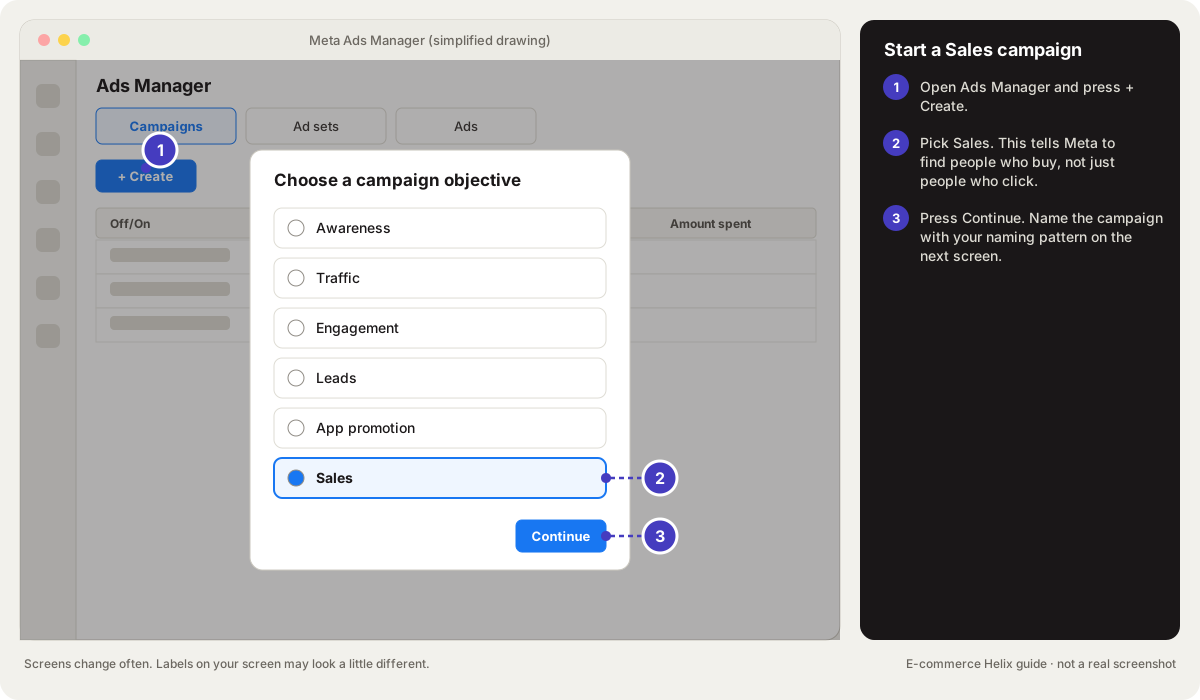
  1. In Ads Manager, click + Create.
  2. Choose Sales, click Continue, then OK.
  3. Check that Advantage+ at the top right reads On. Leave budget, audience and placements as Meta sets them.

Expected result

Your main campaign for new customers is an Advantage+ sales campaign.

Tips

Campaign
The top level in an ad account. It holds the goal, like getting sales.
Advantage+
Meta's automatic settings that let its system choose audience, placements or budget for you.

Lesson 7.3: Ad formatsAttract

In short

The format is the shape of the ad: video, image, carousel and more.

Do this now

Step 1: For each ad in your next batch, pick the format from the table below that fits its job.

Why this matters

The format is the shape of the ad: video, image, carousel and more. Each format suits a different job, and the wrong one can hide a good message.

Step 1 of 30 of 3 done

For each ad in your next batch, pick the format from the table below that fits its job. For most cold ads, that is a single video in 9:16 and 4:5.

Expected result

Every brief names one format.

Good to know

Format Best for
Single video (9:16 tall and 4:5) Most ads aimed at new people
Single image (4:5) Bold statements, offers, reviews
Carousel (swipeable cards) Several products, steps or reasons
Advantage+ catalog ads (once called dynamic product ads) Showing people products they looked at; big product ranges
Collection A shopping experience on mobile
Partnership ads A creator's post run as an ad, showing both your names
Catalog ads with video Product videos built from your product feed

Meta recommends 4:5 for Facebook Feed and 9:16 for Stories and Reels (see Meta: aspect ratios by placement).

Lesson 7.4: LaunchingAttract

In short

How you launch decides how fairly ads are tested and whether they keep their likes and comments.

Do this now

Step 1: Make the new ads in your switched-off build campaign.

Why this matters

How you launch decides how fairly ads are tested and whether they keep their likes and comments. Build new ads in a switched-off campaign, copy them across with the same post, and switch them on together.

Step 1 of 50 of 5 done

Make the new ads in your switched-off build campaign.

  1. In Ads Manager, open the build campaign (its On/Off switch is grey).
  2. Click the Ads tab.
  3. Click + Create and make one new ad. Repeat for each ad.

Expected result

The new ads sit in the paused build campaign, with "Off" under Delivery.

Tips

Campaign
The top level in an ad account. It holds the goal, like getting sales.

Good to know

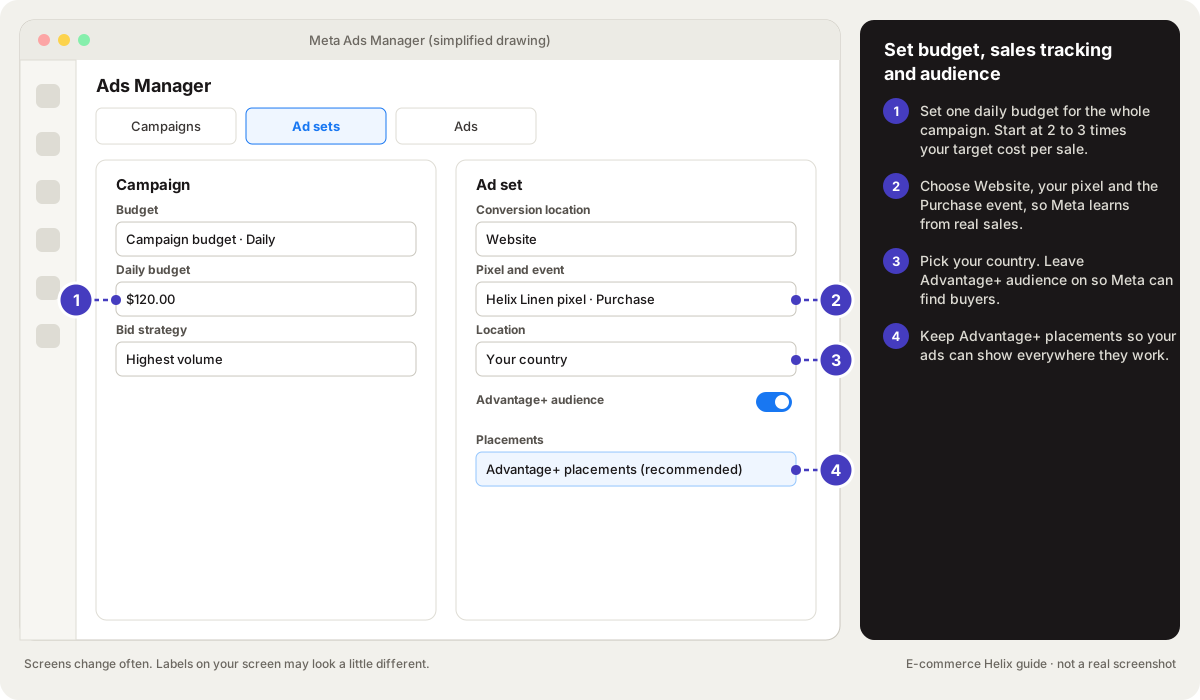
Start a Sales campaign in Meta Ads Manager

Drawing, not a real screenshot. Labels on your screen may look a little different. Official help: Meta: create a campaign in Ads Manager

Set budget, sales tracking and audience

Drawing, not a real screenshot. Labels on your screen may look a little different.

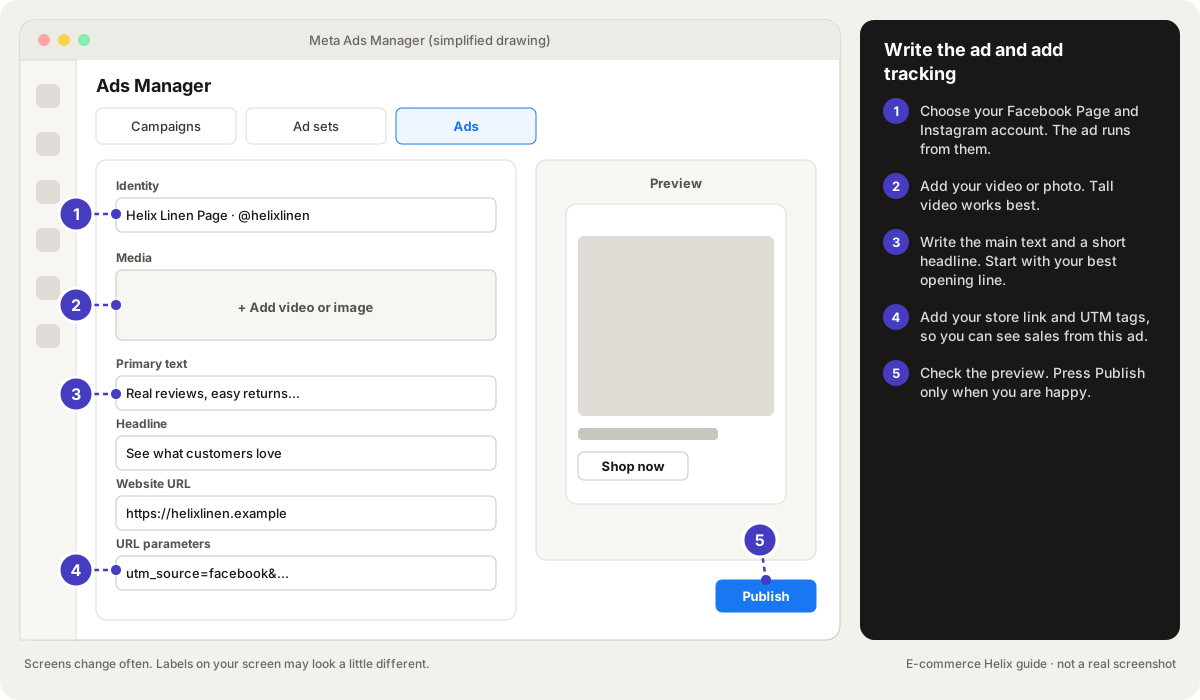
Write the ad and add tracking

Drawing, not a real screenshot. Labels on your screen may look a little different.

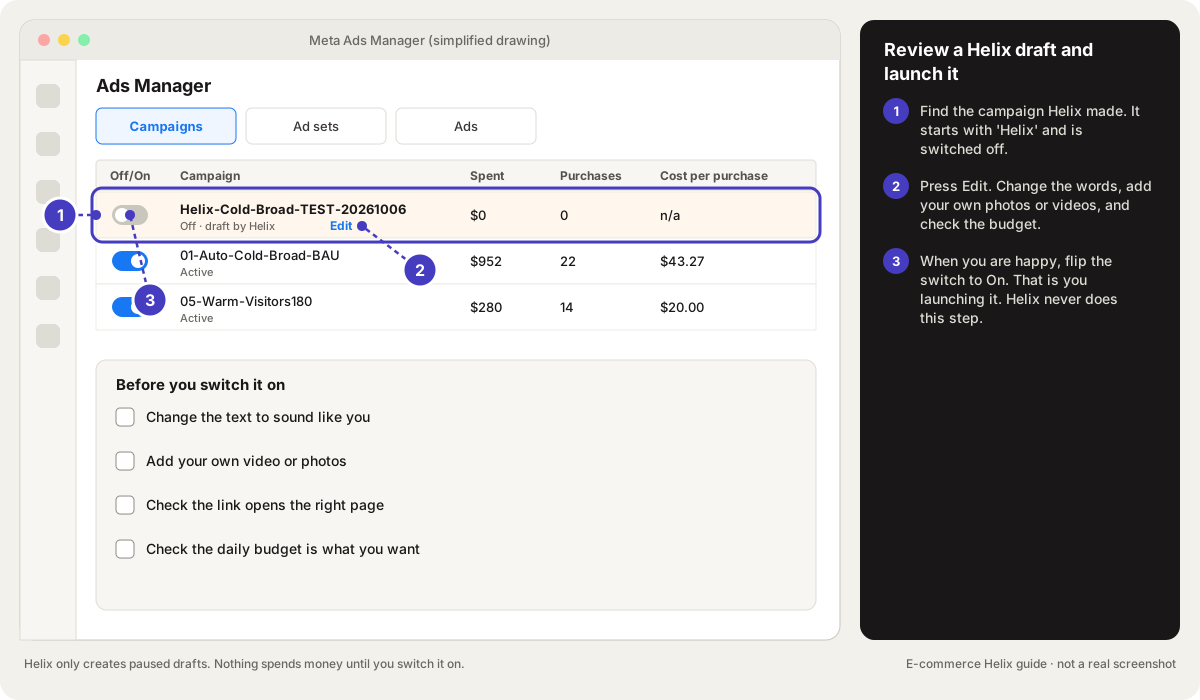
Review a Helix draft and launch it

Drawing, not a real screenshot. Labels on your screen may look a little different.

Lesson 7.5: The learning phaseAttract

In short

The learning phase is the first days after you start or change an ad set .

Do this now

Step 1: Before you edit a live ad set, check if the edit restarts learning.

Why this matters

The learning phase is the first days after you start or change an ad set. Meta is still working out who to show it to. It usually ends after about 50 results in the week after the last big edit. With fewer, Delivery shows "Learning limited". Results are unstable during learning. Knowing what resets it saves you from breaking good campaigns (see Meta: the learning phase).

Step 1 of 30 of 3 done

Before you edit a live ad set, check if the edit restarts learning. These do: changing ads, audience, conversion event or bid strategy, or pausing 7+ days. So can a big budget change, often over 20% (Meta: significant edits).

Expected result

You only make big edits on purpose.

Tips

Ad set
The middle level in Meta. It holds who sees the ads, where, and often the budget.

Lesson 7.6: Daily optimisation in 10 minutesAttract

In short

Ten minutes a day keeps Meta healthy.

Do this now

Step 1: Set your stance from your scorecard: push, careful push, hold or defend (Lesson 1.6).

Why this matters

Ten minutes a day keeps Meta healthy. Five steps in the same order every day turn a confusing dashboard into one clear action. In Helix, Your ads shows the verdicts for you.

Step 1 of 50 of 5 done

Set your stance from your scorecard: push, careful push, hold or defend (Lesson 1.6).

Expected result

You have one word for today.

Tips

Lesson 7.7: Reach potentialAttract

In short

Reach potential is how many people an ad can reach.

Do this now

Step 1: See which ads reach the most people.

Why this matters

Reach potential is how many people an ad can reach. After that, the same people start seeing it twice. An ad with a tiny reach cannot grow, even if its cost per sale is great.

Step 1 of 30 of 3 done

See which ads reach the most people.

  1. In Ads Manager, open the Ads tab.
  2. Set the date to Last 7 days.
  3. Click Columns, then Customise columns. Tick Reach and Frequency and click Apply.
  4. Click the Reach column header to sort.

Expected result

You can see which ads reach many people and which reach few.

Tips

Frequency
How many times, on average, the same person saw your ad.

Lesson 7.8: Managing expensive cold campaignsAttract

In short

Cold campaigns for new people always look costly.

Do this now

Step 1: Compare cold campaigns only with other cold campaigns, never with warm ones.

Why this matters

Cold campaigns for new people always look costly. Meta misses many of the sales they cause, because people buy days later another way. Judging them wrongly leads to cutting the campaigns that feed the whole store.

Step 1 of 30 of 3 done

Compare cold campaigns only with other cold campaigns, never with warm ones.

Expected result

Your cold campaigns are ranked against each other.

Lesson 7.9: Metrics by funnel layerAttract

In short

The funnel layer is how well the audience knows you: cold, mixed, warm or hot.

Do this now

Step 1: Label each campaign with its layer using the naming pattern from Lesson 6.7.

Why this matters

The funnel layer is how well the audience knows you: cold, mixed, warm or hot. Each layer has its own numbers to watch and its own allowance for cost per sale.

Step 1 of 20 of 2 done

Label each campaign with its layer using the naming pattern from Lesson 6.7.

Expected result

Every campaign name shows Cold, Mixed, Warm or Hot.

Tips

Campaign
The top level in an ad account. It holds the goal, like getting sales.

Good to know

Layer Who Main numbers to watch
Cold Never heard of you Reach, CPM, hook rate, outbound CTR, share of new customers, cost per sale compared with 2 times target
Mixed Cold and warm together Cost per sale compared with 1.25 times target, frequency, share who engaged
Warm Visited or engaged Cost per sale compared with target, frequency
Hot Added to cart or started checkout Cost per sale compared with 0.75 times target, frequency

Lesson 7.10: Scaling challengeGrow

In short

A scaling challenge is a planned 2 to 4 week push to spend more.

Do this now

Step 1: Prepare 6 to 10 new ads before you start.

Why this matters

A scaling challenge is a planned 2 to 4 week push to spend more. If you have new ads ready and a loss limit set, even a failed test teaches you. It shows what is holding you back.

Step 1 of 50 of 5 done

Prepare 6 to 10 new ads before you start.

Expected result

Fresh ads are ready to add as frequency rises.

Tips

Frequency
How many times, on average, the same person saw your ad.

Lesson 7.11: Attribution settingsAttract

In short

Attribution is how a platform decides which ad gets credit for a sale.

Do this now

Step 1: In Ads Manager, click the Columns menu, then Compare attribution models .

Why this matters

Attribution is how a platform decides which ad gets credit for a sale. Meta's standard setting credits sales within 1 or 7 days of a link click. It also credits sales within 1 day of a view or of another tap on the ad. That is not the full truth, so you need a second check (see Meta: attribution settings).

Step 1 of 30 of 3 done

In Ads Manager, click the Columns menu, then Compare attribution models. Tick Incremental and click Apply. It counts only sales Meta's model thinks the ad truly caused (see Meta: incremental attribution results).

Expected result

You can see how much of Meta's reported sales are likely extra sales.

Tips

Attribution
Deciding which ad or channel gets credit for a sale. Meta's default counts sales within 7 days of a click or 1 day of a view.

Lesson 7.12: TroubleshootingAttract

In short

Meta throws up a handful of common problems, from ads that will not spend to strange labels.

Do this now

Step 1: Find your problem in the table below.

Why this matters

Meta throws up a handful of common problems, from ads that will not spend to strange labels. Each has a known fix.

Step 1 of 20 of 2 done

Find your problem in the table below.

Expected result

You have the matching fix.

Good to know

Problem What to check
Ads only spend part of the budget Budget too low for the audience, billing problems, policy limits, the schedule
Ads stuck "In review" Review usually takes up to 24 hours. Check for policy or catalog errors. After 48 hours, copy the ad and try again.
Meta adds a discount label you did not set The ad's Advantage+ creative enhancements and offer settings. Turn off automatic offers.
"Data restrictions applied" Meta has put your store in a sensitive category. Ask for a review.
Instagram sells worse than Facebook Usually fine. Judge both together. Only remove a placement with strong proof.
You reached the limit on ads Archive dead ads. Combine ad sets.
You want ads to run only at certain hours Ad sets with either budget type can use Delivery scheduling (Meta: schedule an ad set). Most stores do better leaving ads on all day. Test it only with clear proof that some hours lose money.
You keep overspending in a sale Set a spending limit on the campaign or the account before the sale starts.

Lesson 7.13: Launch your first Meta ad in 30 minutesAttract

In short

Most people stall on their first ad because Ads Manager has hundreds of settings.

Do this now

Step 1: Check your setup. Open Events Manager (Ads Manager menu > All tools > Events Manager ).

Why this matters

Most people stall on their first ad because Ads Manager has hundreds of settings. You need about eight of them. This lesson walks you through a simple first campaign. You make one Sales campaign, one ad set and 3 to 5 ads. You use a budget you already know you can afford. Or let Helix build it for you as a paused draft.

Step 1 of 100 of 10 done

Check your setup. Open Events Manager (Ads Manager menu > All tools > Events Manager). Your pixel should show Purchase events from your store. If it does not, do Lesson 7.1 steps 4 to 6 first.

Expected result

You can see Purchase events, so Meta can learn who buys.

Tips

Pixel
A small piece of code on your store that tells Meta when someone views, adds to cart or buys.

Good to know

Words you will see: a campaign holds the goal (Sales). An ad set holds the budget, who sees it and where. An ad is the video or image people see. The pixel tells Meta when someone buys. Advantage+ means Meta makes some choices for you, which works well for most new stores.

Lesson 7.14: Find your way around Ads ManagerAttract

In short

Ads Manager looks busy, but you only use a handful of parts.

Do this now

Step 1: Open Ads Manager (adsmanager.facebook.com, or Meta Business Suite > All tools > Ads Manager ).

Why this matters

Ads Manager looks busy, but you only use a handful of parts. Once you know what each one is for, it stops being scary. It becomes a simple table you check for 5 minutes a day.

Step 1 of 40 of 4 done

Open Ads Manager (adsmanager.facebook.com, or Meta Business Suite > All tools > Ads Manager). Check the ad account name at the top left.

Expected result

You are in your store's ad account.

Tips

Good to know

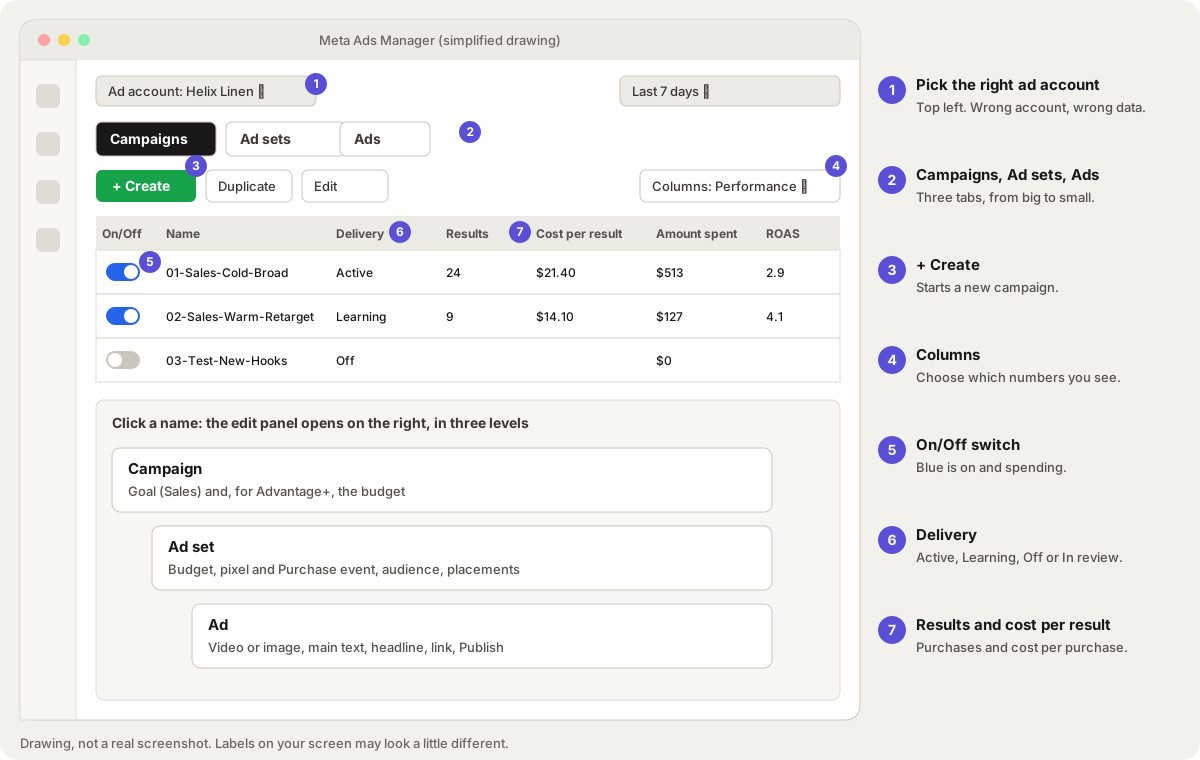
  1. Ad account (top left): make sure it shows your store's account.
  2. Campaigns, Ad sets, Ads tabs: three levels, from big (the goal) to small (what people see). Ticking a campaign filters the other tabs to it.
  3. + Create: starts a new campaign.
  4. Columns: chooses which numbers the table shows. Save a "Daily" preset (Lesson 7.1).
  5. On/Off switch: blue means on and spending; grey means off.
  6. Delivery: Active means running. Learning means Meta is still working out who buys. Learning limited means too few results to finish learning. In review means Meta is checking the ad. It can also say Off, or Rejected (click it to see why).
  7. Results and Cost per result: for a Sales campaign, purchases and the cost of each purchase. Amount spent is what you paid. ROAS (return on ad spend) is sales divided by spend.
  8. Date range (top right): set it to Last 7 days for daily checks.

The parts that matter:

Find your way around Meta Ads Manager

Lesson 7.15: Cost caps, bid caps and value rulesGrow

In short

By default, Meta spends your whole budget and tries to get the most sales.

Do this now

Step 1: Only try this when a campaign already has at least 50 sales a week and steady results.

Why this matters

By default, Meta spends your whole budget and tries to get the most sales. Caps and rules let you tell Meta the most you will pay, or which buyers are worth more to you. Used well, they protect profit. Used too early, they stop your ads from spending at all.

Step 1 of 60 of 6 done

Only try this when a campaign already has at least 50 sales a week and steady results. That is a rule of thumb: caps need plenty of data to work (see Meta: bid strategies). Check in Ads Manager on the Campaigns tab.

Expected result

You know if the campaign is ready. If not, keep the default setting.

Tips

Campaign
The top level in an ad account. It holds the goal, like getting sales.

Lesson 7.16: Show the right product to the right person with catalog adsAttract

In short

Catalog ads pick products from your store.

Do this now

Step 1: Sync your products. In Shopify, open the Facebook & Instagram sales channel and connect your catalog.

Why this matters

Catalog ads pick products from your store. They show each person the ones they looked at or are likely to want. Meta calls them Advantage+ catalog ads (once called dynamic product ads). They work best when you have more than a handful of products. They only work well if your product list and your pixel agree on which product is which.

Step 1 of 60 of 6 done

Sync your products. In Shopify, open the Facebook & Instagram sales channel and connect your catalog. Then, in Meta Commerce Manager, check that your products, prices and stock look right.

Expected result

Your products show in Commerce Manager with the same prices and stock as your store.

Tips

Good to know

TikTok has catalog ads too. In TikTok Ads Manager, open Assets > Catalog to add products. You need at least 4 products that are in stock, approved and active to run them (see TikTok: create Catalog Ads).

Self-check

  1. Name two edits that restart learning.
  2. Why can an ad with a low cost per sale be a poor choice for scaling?
  3. How should you judge cold campaigns?
  4. What do you do if a campaign was hacked?
Answers
  1. Any two of: a big budget change (often over 20%), changing ads, audience, conversion event or bid strategy, or pausing 7+ days.
  2. It reaches few people before the same people see it again and again.
  3. Against other cold campaigns, and by your total MER and new-customer trend.
  4. Turn it off, remove unknown access, secure the admin logins, contact Meta support and dispute the charges.

Words to know in this module

Creative
The ad itself: the picture or video plus the words.
Pixel
A small piece of code on your store that tells Meta when someone views, adds to cart or buys.
Campaign
The top level in an ad account. It holds the goal, like getting sales.
Broad targeting
Letting Meta find buyers with few or no audience limits. Works best with strong ads.
CPA
Cost per acquisition: how much ad money it took to get one sale.
Advantage+
Meta's automatic settings that let its system choose audience, placements or budget for you.
Learning phase
The days after you start or make a big change to an ad set. Meta is still working out who to show it to. It usually ends after about 50 results in the week after that change.
Ad set
The middle level in Meta. It holds who sees the ads, where, and often the budget.
Two-factor authentication
A second check, like a code from an app, needed to log in. It stops most account takeovers.
Test order
A pretend order you place yourself to check payments, emails and tracking work.
ROAS
Return on ad spend: how many dollars of sales you get for each $1 of ads. ROAS 3 means $3 of sales for $1 of ads.
CTR
Click-through rate: out of every 100 people who saw your ad, how many clicked.
Frequency
How many times, on average, the same person saw your ad.
Chargeback
When a customer asks their bank to reverse a card payment. The money is taken back, and you can send evidence to dispute it.
All words to know